
BinBot App Stores & WhatsApp Launch Command
Complete operational playbook for publishing BinBot across Google Play, Apple App Store, and activating the +353 89 457 0801 WhatsApp Business Cloud API for smart residential waste locks.
Tick milestones in tabs to track real-time progress

WhatsApp Cloud API
Direct resident two-way messaging, instant latch trigger ("Open Bin 1"), and delivery status webhooks.
Email & SMS Relays
Automated resident onboarding credential dispatch, key card delivery notices, and Twilio SMS fallback for opening bins.

Google Play Console
Android 15+ App Bundle (.aab), 20-tester track verification, IARC Content Rating (3+), and Play Store listing.

Apple App Store
iOS 18+ App Store Connect product page, 6.9"/6.5" screenshots, App Privacy Nutrition Label, and Demo Reviewer rig.
🔗 Official Direct Portal Deep Links
One-click direct navigation to the exact management pages on Meta, Google, and Apple.
Looking for Physical Print Media & Signage?
SEPARATE DEDICATED SECTIONAll physical touchpoints—including double-sided A4 resident mailers, weather-resistant vinyl bin stickers, master wall signage, door boards, and lobby posters—are managed in the separate Print Media, Stickers & Signage section.
"Is BinBot Number (0894570801) Ready to Go?" — 7-Point Live Readiness Diagnostic
You mentioned you have already added the number in your Meta Business Account. Use this interactive 7-point diagnostic tool below to verify if your number is fully active or if any critical Meta requirements are pending.
Number Connection Status: "CONNECTED"
Open WhatsApp Phone Numbers in your Meta Business Portfolio. Find +353 89 457 0801.
Display Name Approval: "APPROVED"
Meta requires WhatsApp Business Display Names to be reviewed and certified before official messaging.
BinBot or SmartBins BinBotsmartbins.ie).
Two-Step Verification 6-Digit PIN Registered
Cloud API numbers require a 6-digit registration PIN to lock the number to Meta's Cloud API servers.
curl -X POST \
  'https://graph.facebook.com/v21.0/<PHONE_NUMBER_ID>/register' \
  -H 'Authorization: Bearer <ACCESS_TOKEN>' \
  -H 'Content-Type: application/json' \
  -d '{
    "messaging_product": "whatsapp",
    "pin": "123456"
}'App Associated with WhatsApp Product & Number ID
Navigate to Meta Developers → Your App → WhatsApp → API Setup.
<15-digit ID from dashboard><15-digit ID>Webhook Subscribed to "messages" (Receive "Open Bin 1")
To let residents type "Open Bin 1" or "Unlock Recycling", Meta must post messages to your backend.
https://us-central1-lock-4ff2a.cloudfunctions.net/whatsappWebhookbinbot_smartbins_dublin_2026System User Token Generated (Never Expires)
Temporary tokens generated in the Developer dashboard expire in 24 hours. You must create a System User in Business Settings.
- Open Business Settings → System Users.
- Click Add → Name:
BinBot-CloudAPI-Service(Role: Admin). - Assign Asset → Select your Meta App → Give Full Control.
- Click Generate New Token → Select permissions:
whatsapp_business_messaging&whatsapp_business_management. - Set Token Expiration to Never and save token securely.
Payment Method Attached to WABA
Even though Meta provides 1,000 free service conversations per month, an active payment method (credit card) must be attached to the WhatsApp Business Account.
🧪 BinBot Live Resident WhatsApp Links
Test these direct wa.me deep links from any mobile phone or browser.
Google Play Developer Account & ID Verification
Create developer account at play.google.com/console/signup.
- Fee: $25 USD one-time registration fee.
- Account Type: Organization (requires D-U-N-S number) or Personal (requires passport / government photo ID).
- Identity Verification: Complete identity verification and verify billing address.
Main Store Listing Fields (Copy-Ready)
Play Store Visual Asset Specifications & Direct Downloads
📥 Official Generated Store Assets (Ready to Upload)

App Content Declarations & Questionnaire Answers
https://smartbins-ie.web.app/privacy.html
Google Play Data Safety Form Answers
privacy@smartbins.ie).Closed Testing Track (20 Testers for 14 Days)
Create a Closed Testing track in Play Console → Add Google Group / email list of verified resident beta testers → Upload .aab build → Wait 14 days → Apply for Production.
Apple Developer Account & Organization Verification
- Direct Account Portal: https://developer.apple.com/account ↗
- Organization & Identity Verification: Ensure legal entity name, CRO business documentation, and D-U-N-S verification are verified with Apple Developer Relations.
- Document Upload Confirmation: Verify all requested corporate validation proofs are completed at Apple File Upload Confirmation ↗.
- License Agreements, Tax & Banking: Review and accept the latest Apple Developer Program License Agreement and Schedule 2.
- EU DSA Trader Status: Confirm Digital Services Act trader compliance declaration (mandatory for European app distribution).
- Active Membership Status: Confirm the banner on your developer dashboard displays "Active Membership" ($99/yr) before proceeding to App Store Connect.
App Store Metadata & Description (Copy-Ready)
Support, Privacy & Category Configuration
https://smartbins-ie.web.app
https://smartbins-ie.web.app
https://smartbins-ie.web.app/privacy.html
App Review Information (CRITICAL: Avoid Rejection 2.1)
App Store Connect Visual Assets & Direct Downloads
📥 App Store Production Asset (Ready to Upload)
App Store Privacy Nutrition Label Form
Linked to User: Yes (Linked to resident's apartment profile).
Tracking: No (Data is NOT used for tracking across apps).
📋 1-Click Universal Copy Hub
Instantly copy any text string, identifier, URL, or JSON payload needed during submission.
+353 89 457 0801 (National: 0894570801)
ie.smartbins.binbot
https://smartbins-ie.web.app/privacy.html
https://smartbins-ie.web.app
smartbins,binbot,recycling,waste,apartment,omc,bin lock,smart bin,access control
https://us-central1-lock-4ff2a.cloudfunctions.net/whatsappWebhook
📱 Android & Mobile App Store Digital Assets
Production-ready asset files generated from the official SmartBins logo, ready for immediate download and upload.
🎨 Brand Vector Logos & Mockups
Vector SVG and high-resolution PNG brand marks.

assets/brand/smartbins-logo.svg
assets/brand/smartbins-logo-dark.svg


assets/icons/binbot.svg
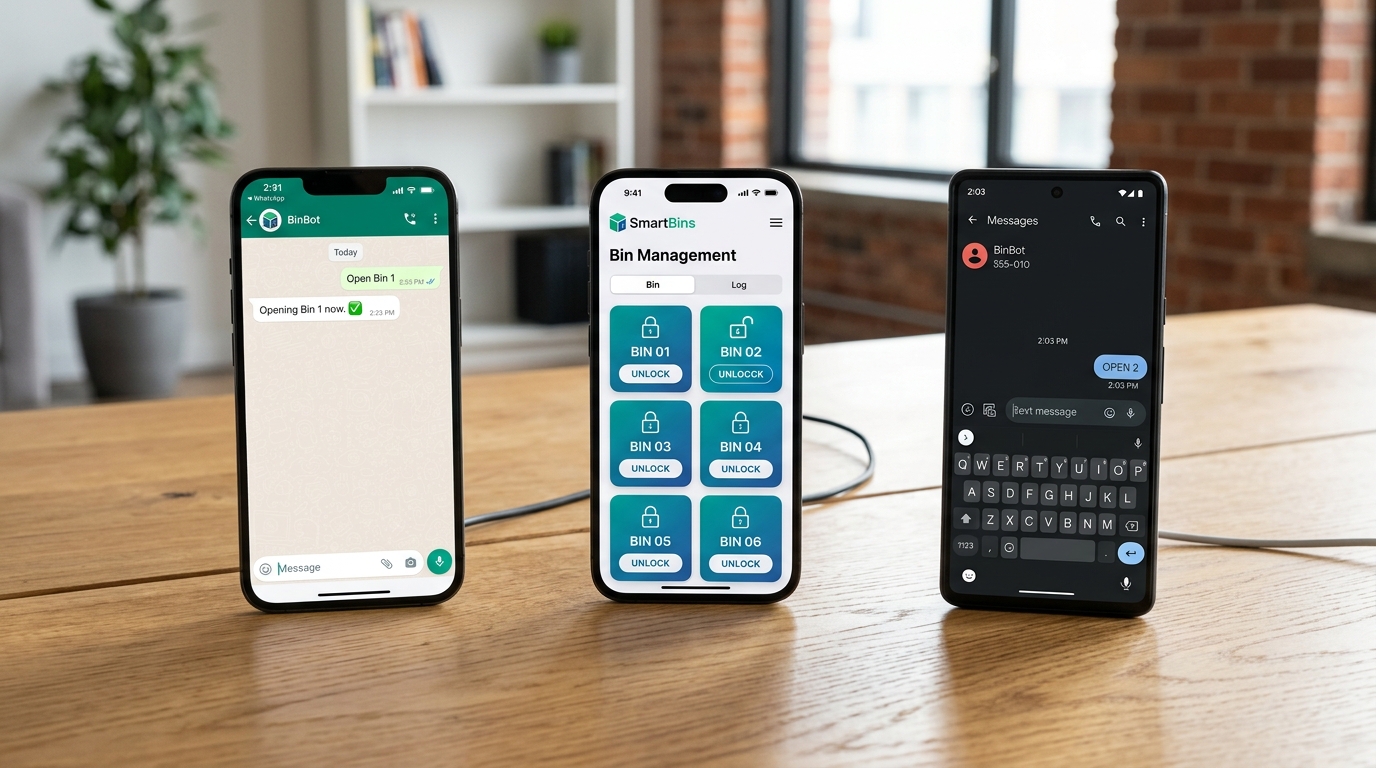
assets/mockups/binbot_multichannel_apps.jpg
BinBot State Machine
Strict enforcement of user registration and feature access limits.
Registration State Machine
[ UNREGISTERED USER ]
       │
       ▼
┌───────────────────────────────────────┐
│ STATE: AWAITING_NAME                  │
│ AI Available Tool: provide_name       │
│ Action: Ask for full name.            │
└───────────────────────────────────────┘
       │
       ├─ (AI calls provide_name)
       ▼
┌───────────────────────────────────────┐
│ STATE: AWAITING_ADDRESS               │
│ AI Available Tool: provide_address    │
│ Action: Ask for property address.     │
└───────────────────────────────────────┘
       │
       ├─ (AI calls provide_address)
       ▼
┌───────────────────────────────────────┐
│ STATE: COMPLETED (REGISTERED)         │
│ Profile, GDPR Consent & PIN Created   │
└───────────────────────────────────────┘
       │
       ▼
[ REGISTERED USER CAPABILITIES ]
- update_user_pin
- update_user_contact_info
- delete_user_messages_or_images
- link_accounts
- request_account_linking_code
- verify_account_linking_code
- request_photo_upload
- resolve_thread
- deregister_user
- ... (Add new functions here)
BinBot Gemini Requirements Assistant
⚡ Gemini 1.5 Flash ● Active & ReadyAsk anything about App Store guidelines, Google Play 20-tester rules, Meta WhatsApp Business verification, EU GDPR compliance, or exact metadata fields.
Hello! I am your BinBot Multi-Platform Launch Assistant powered by Gemini.
I have complete knowledge of the SmartBins Ireland architecture, including:
- Meta WhatsApp Cloud API setup for
0894570801(Webhook verification token:binbot_smartbins_dublin_2026). - Google Play Console policy questionnaires, 20-tester opt-in protocols, and Data Safety requirements.
- Apple App Store Connect App Privacy labels, review notes, and background mode declarations.
- Irish GDPR & 18+ Bye-law Compliance ([smartbins.ie/gdpr](https://smartbins.ie/gdpr), [smartbins.ie/privacy](https://smartbins.ie/privacy), [smartbins.ie/terms](https://smartbins.ie/terms)).
Click any suggested question above or type your own question below to clarify requirements!
lock-4ff2a
Print Media, Stickers & Signage Rollout
Production-ready vector templates, high-resolution A4 double-sided letterbox mailers, weatherproof B5 vinyl bin stickers, A1/A2 Foamex store wall signage, A3 door boards, and lobby noticeboards for SmartBins pilot complexes.
🖨️ Physical Print Touchpoints & Vector Assets
All physical printed items distributed to residents or mounted in bin stores.
🌲 Hunterswood Resident Mailer
Double-sided A4 letterbox brochure with tightened 10mm print margins: 4-step dwelling setup, starter pack details, 26th/27th Sept Q&A sessions, EPA 3-stream segregation guide, and vector QR code.
🌳 Parkside Resident Mailer
Double-sided A4 flyer with Parkside branding: Saturday 8PM on-site hardware demo with Conor McElvaney, Sunday 9PM Zoom webinar, 4 setup steps, starter pack details, and dedicated QR code.
🏷️ Bin Decals & Lock Overlays
Weather-resistant outdoor vinyl decals for 1100L Eurobins (Recycling Blue ♻️, Food Waste Brown 🍏, General Waste Grey 🗑️), bin ID badges (#01-#06), and electronic lock controller overlays.
📋 Master Store Wall Signage
Master 3-stream segregation infographics, accepted vs prohibited item lists, zero-contamination rules, 2-month mandatory clear bag evaluation notice, and 5-channel contact helpline banner.
🚪 Bin Store Door Signage
Weatherproof 5mm Corriboard entrance board with 3-channel access rules (Key card tap, App, WhatsApp message), 24/7 CCTV surveillance warning, and interior door exit reminders.
📢 Lobby Signs & Noticeboard Boards
High-visibility 5mm Corriboard announcement signs for main entrance foyers and lifts with scannable QR code dwelling registration and developer Q&A session details.
🎓 5-Slide Resident Training
Mobile-responsive 5-step waste separation training module for resident onboarding and key card activation. Supported by Repak (Catalyst Funded).
🏢 Active Residential Rollout Hubs
Dedicated property portals for resident onboarding, training, dwelling registration, and mobile latch access.
Hunterswood Resident Hub
Dedicated portal for Hunterswood residents (Bin Stores 14 & 15 pilot). Includes Q&A webinar details, dwelling registration, and instant BinBot access.
Parkside Resident Hub
Dedicated portal for Parkside residents. Features on-site demo notices, Sunday live webinar link, dwelling registration, and smart latch simulator.